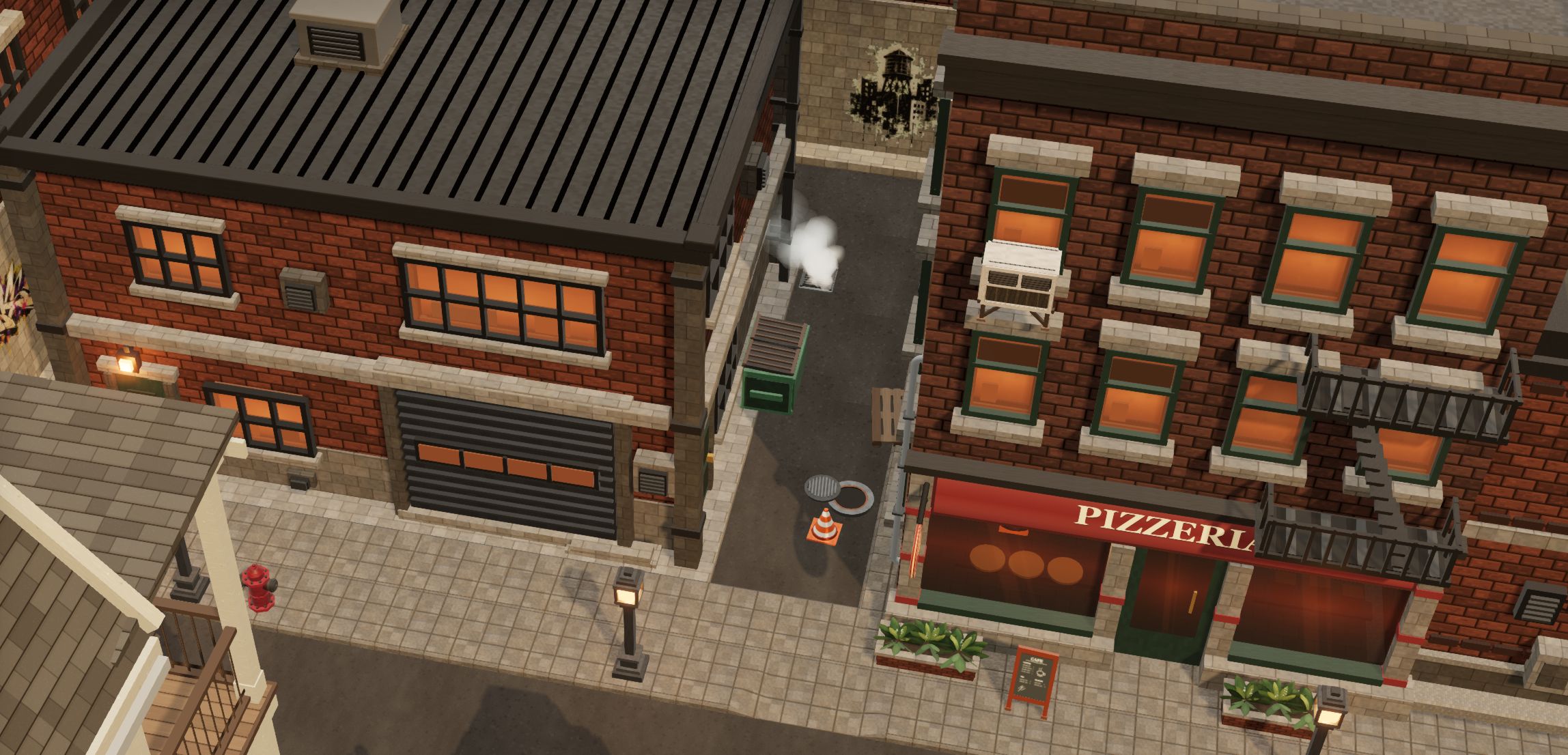
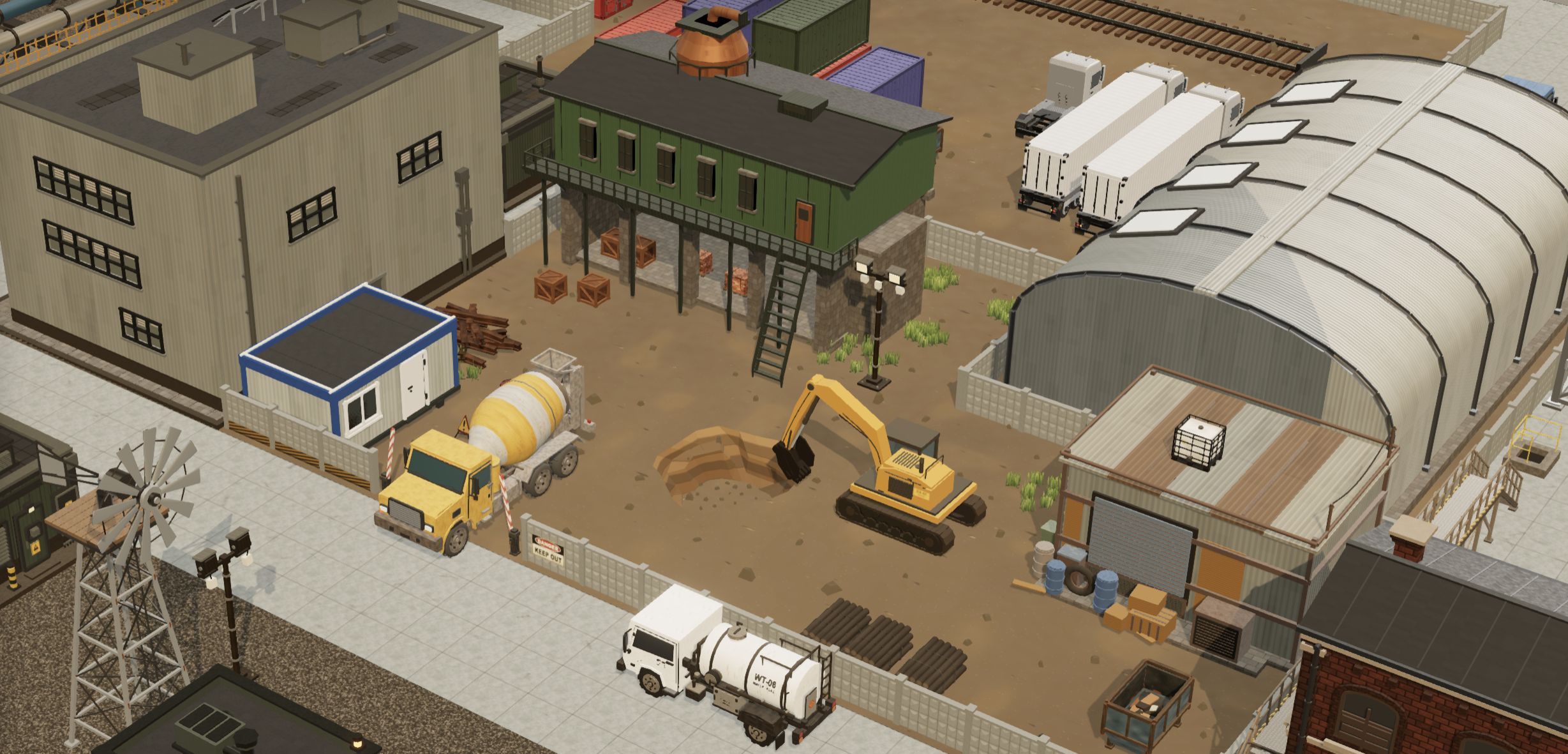
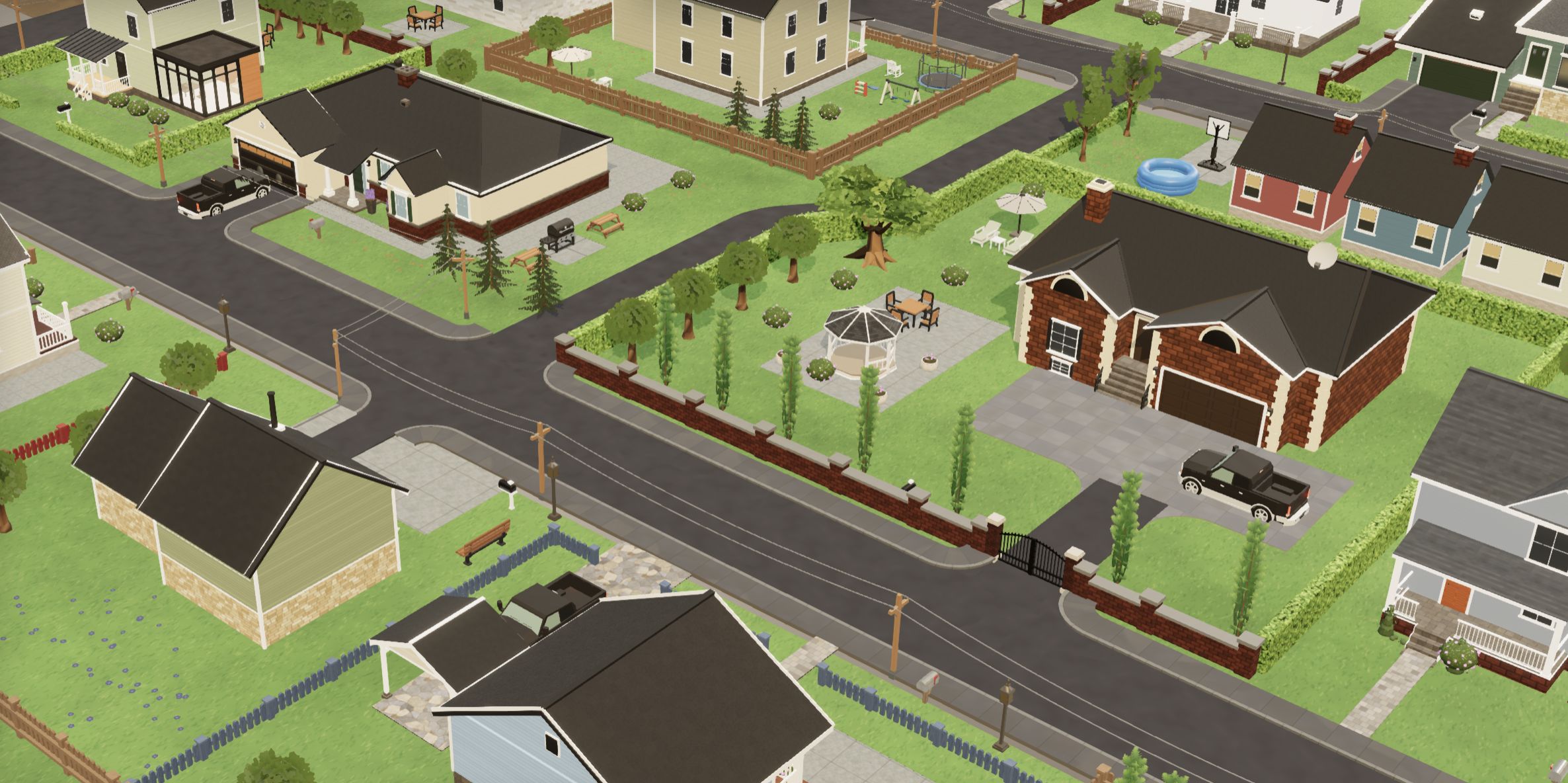
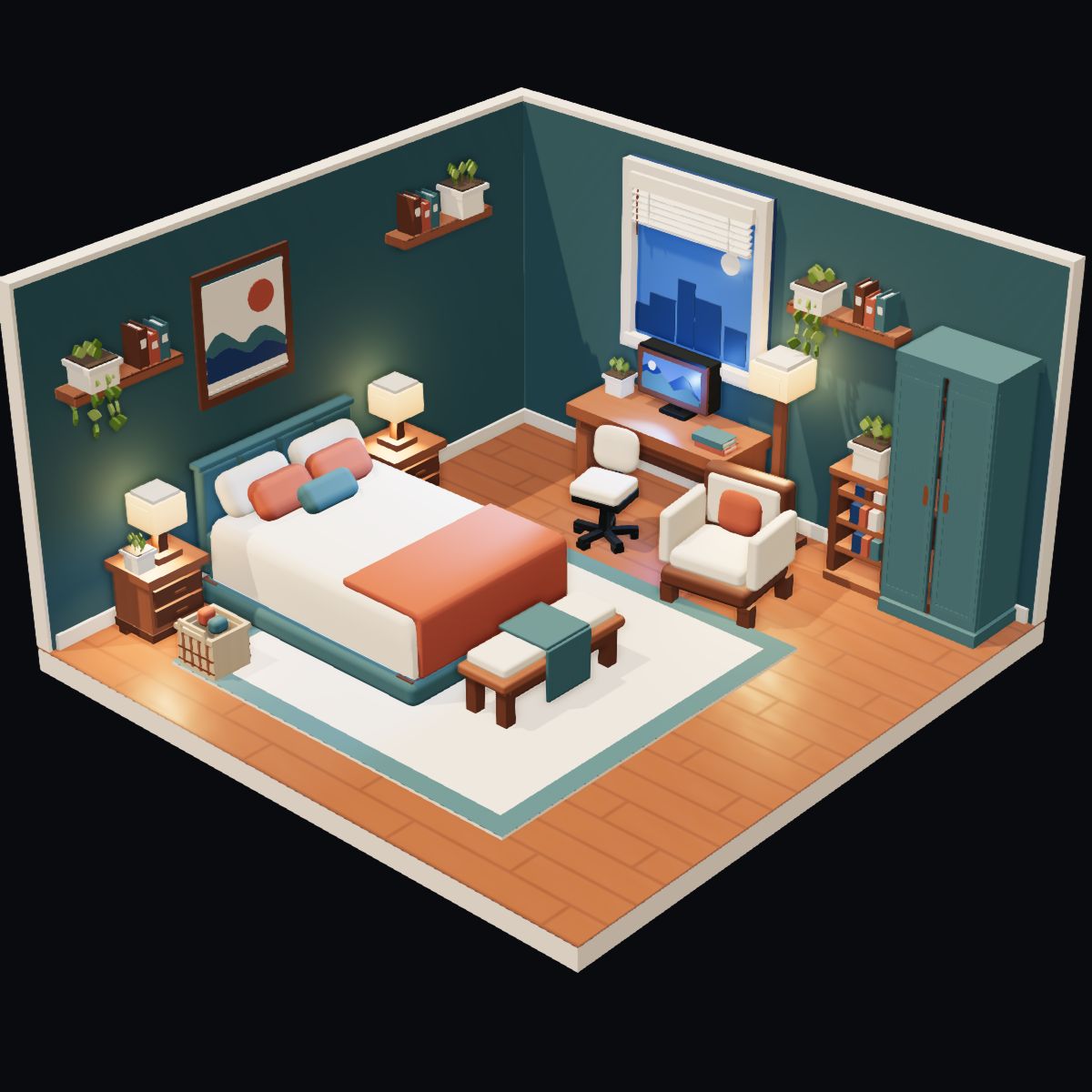
Most three.js shadow problems come down to three numbers: the world size of one shadow-map texel (shadow camera width ÷ mapSize), normalBias in world units, and bias, which is a fraction of the shadow camera’s depth range. Fit the shadow camera to what you see plus the objects that throw shadows into it, check which faces go into the shadow map, then add normalBias and bias in small steps. On r182, also replace PCFSoftShadowMap with PCFShadowMap, and use r183 or later for WebGPURenderer.
Find your case
Everything below uses one DirectionalLight with its orthographic shadow camera, a scene modelled at 1 unit = 1 m, and plain WebGLRenderer in three.js r187, unless a section names another release or renderer. The images come from a test scene built for this article from our pack models. React Three Fiber uses the same renderer, so the same rules apply there.
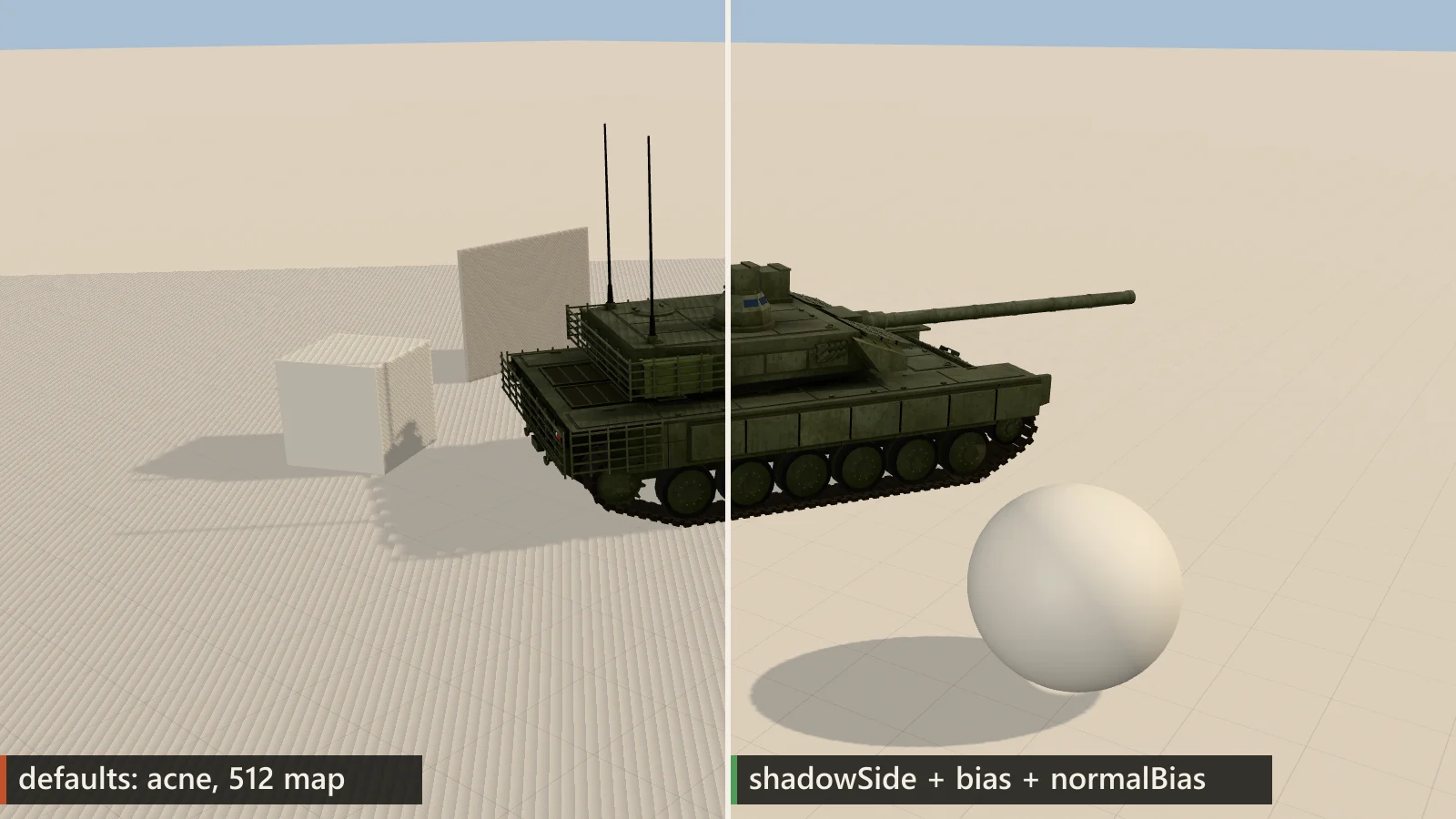
shadowSide = BackSide, normalBias 0.02, bias −0.0005, 2048² map.The route that fixes most scenes, in this order:
- Check the release. r182 has two shadow bugs: PCFSoftShadowMap without filtering and acne in WebGPURenderer. Update before you tune anything.
- Look at the shadow camera. Add
new THREE.CameraHelper( light.shadow.camera )and see what it covers: the visible area, plus anything outside it that throws a shadow into it. - Fit its size and depth range, and compute the size of one texel (pixelation, peter-panning).
- Check which faces go into the map:
sideandshadowSideof the materials (acne). - Add
normalBias, thenbias, in small steps (the matrix). - Choose the softness last: PCF
radius, VSM or PCSS (filters, soft shadows).
Symptom → cause → fix, 13 cases
Scroll the table sideways for all columns →
| What you see | Cause | Fix |
|---|---|---|
| Moiré or stripes on lit surfaces | A surface shadows itself: its lit faces are in the shadow map | shadow for closed DoubleSide meshes, then a small normal |
| Acne only with VSM | VSM draws the material’s own side, and receivers cast too | Tighten near/far, then a small negative bias |
| Shadows start a few centimetres away from the object | Too much bias for the shadow camera’s depth range | Tighten far − near, lower bias, try normal instead |
| Thin parts (antennas, railings, leaves) lose their shadow | Texels too large, or normal moves the lookup past the part | Fit the frustum or raise map, then lower normal |
| Blocky, blurry shadow edges | One texel covers too much ground | Fit the shadow camera to the view, or use cascades |
| Shadows of objects just off screen are missing | Shadow camera fitted to the view only | Extend the frustum towards the light by the longest shadow |
| Shadows shimmer when the camera moves | The shadow camera moves by fractions of a texel | Snap the shadow camera to whole texels |
| PCF looks noisy or grainy | r182+ PCF uses 5 rotated samples | Keep radius ≤ 3–4; VSM or PCSS for wide penumbrae |
| Light bleeds through overlapping VSM shadows | Variance estimate between two occluders | Smaller VSM radius, tighter depth range, or PCF |
| A character needs a grounding shadow; shadow maps are too expensive | The shadow pass draws all casters again | Blob quad, or a contact shadow rendered once |
| Frame time doubles when shadows are on | Casters drawn again (CPU) and the map filled and sampled (GPU) | Measure CPU and GPU separately; fewer casters, static map, smaller frustum |
| Pixelated shadows after updating to r182 | r182 silently fell back to unfiltered shadows | PCFShadow (+ radius) or update to r183+ |
Sawtooth acne only in Web | r182 WebGPU drew the lit faces into the map | Update to r183+ before tuning bias |
How a shadow map decides
A directional shadow takes two renders. First three.js draws every mesh with castShadow — a caster — from the light into a depth texture, the shadow map, through an orthographic camera, light.shadow.camera. The box of that camera, its frustum (left/right/top/bottom across the light, near/far along it), decides what gets into the map. Then, for every pixel of a mesh with receiveShadow — a receiver — the shader projects the pixel into the map and compares depths: if the map holds something closer to the light, the pixel is in shadow.
The map is a grid. One cell, a texel, stores a single depth. Between texel centres the receiver’s true depth and the stored depth differ by up to half a texel times the surface slope as seen from the light, so a lit surface that is itself in the map can shadow itself in a regular pattern. That is shadow acne. Three settings work against it, in different units:
shadow.biasis added to the receiver’s depth in shadow-map space, where 0 isnearand 1 isfar. For the orthographic camera of a directional light that is a depth offset along the light direction ofbias × (far − near)world units: −0.0005 is 6 cm with near 1 / far 120 and 50 cm with far 1000. Negative values move receivers towards the light. This is not the gap you see on the ground; that also depends on the angle between the light and the surface. Spot and point lights use a perspective shadow camera with non-linear depth, so the formula does not carry over to them.shadow.normalBiasmoves the point that is looked up in the map along the receiver’s normal, in world units. The casters in the map do not change; what changes is where each receiver pixel samples. It clears acne on sloped surfaces with less depth offset thanbias, but the shadow edge on the receiver moves, and contacts can open.material.shadowSidechooses which faces are drawn into the map. Withnull(the default) three.js draws the opposite side: back faces ofFrontSidematerials. On a closed mesh the depth stored behind a lit front face is then the back of the object, usually far behind it, so acne on lit faces is rare.
// three.js r187, src/renderers/webgl/WebGLShadowMap.js (abridged)
const shadowSide = {
  [ FrontSide ]: BackSide, [ BackSide ]: FrontSide, [ DoubleSide ]: DoubleSide
};
const side = material.shadowSide !== null ? material.shadowSide
  : type === VSMShadowMap ? material.side      // VSM: the same side
  : shadowSide[ material.side ];               // others: the opposite

// shadowmap_vertex.glsl.js: normalBias offsets the lookup in world space
shadowWorldPosition = worldPosition + vec4(
  shadowWorldNormal * directionalLightShadows[ i ].shadowNormalBias, 0 );
The other number that decides quality is the world size of one texel: shadow camera width ÷ mapSize. Keep a helper like this next to your light setup; every value in this article is converted with it.
function shadowStats( light ) {
  const c = light.shadow.camera, s = light.shadow.mapSize;
  return {
    texel: ( c.right - c.left ) / s.x,                  // m per texel
    biasDepth: Math.abs( light.shadow.bias ) * ( c.far - c.near ), // m
    normalBias: light.shadow.normalBias                 // m
  };
}

// a starting point for a ~30 m play area; tune it for your scene
renderer.shadowMap.enabled = true;
renderer.shadowMap.type = THREE.PCFShadowMap;  // r182+: soft by itself
const sun = new THREE.DirectionalLight( 0xffffff, 3 );
sun.castShadow = true;
sun.shadow.mapSize.set( 2048, 2048 );
const cam = sun.shadow.camera;
cam.left = cam.bottom = -16;
cam.right = cam.top = 16;        // 32 m / 2048 = 1.56 cm per texel
cam.near = 1; cam.far = 120;     // bias is a fraction of this range
sun.shadow.normalBias = 0.02;    // ≈ 1.3 texels
sun.shadow.bias = -0.0005;       // ≈ 6 cm of light-space depth
sun.position.set( 30, 40, -30 );
sun.target.position.set( 0, 0, 0 );
scene.add( sun, sun.target );    // a moved target must be in the scene
scene.add( new THREE.CameraHelper( cam ) );   // while tuning
Shadow acne: why it appears and the fix order
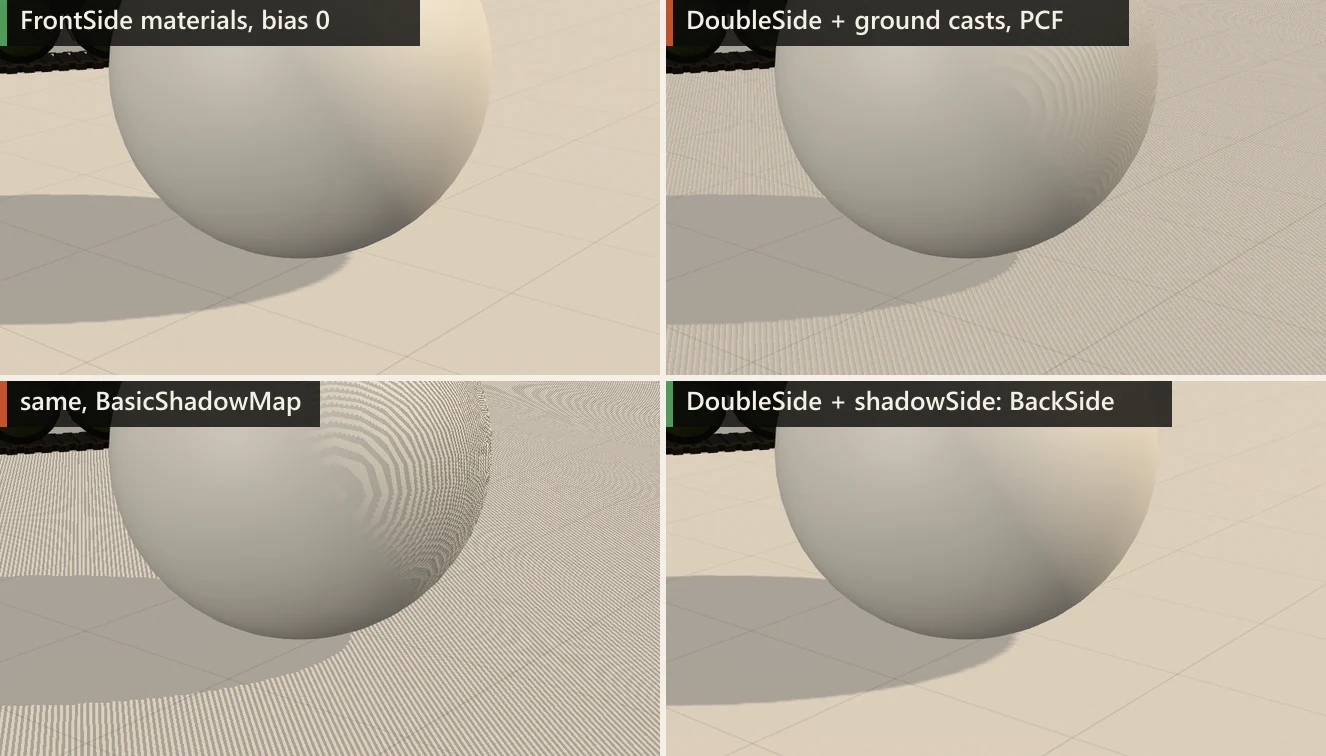
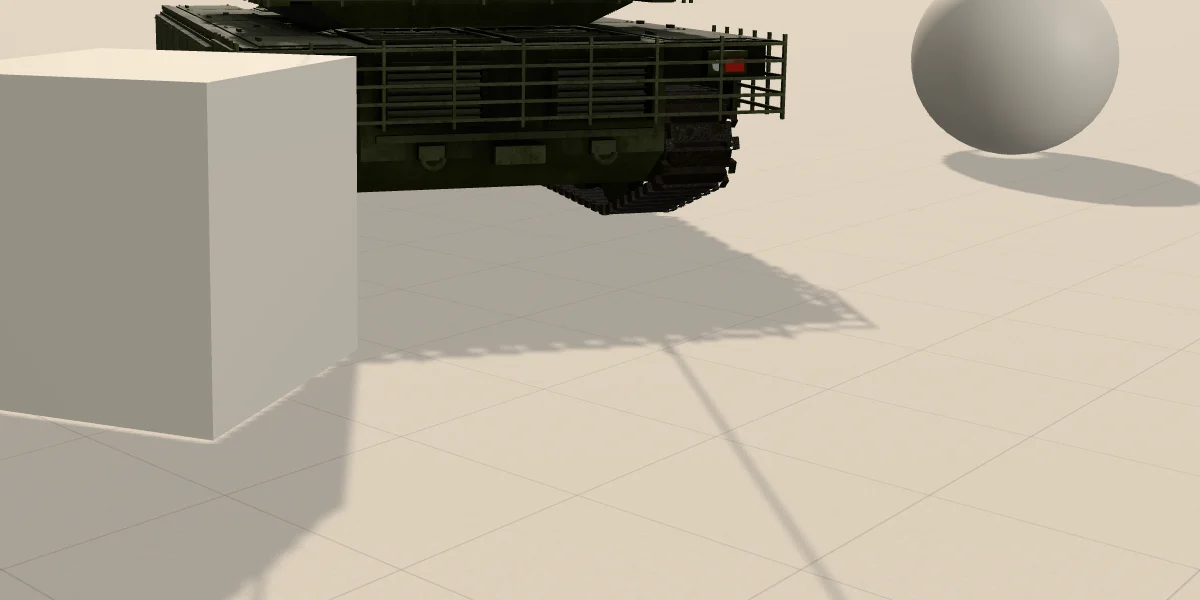
FrontSide meshes are clean by default. DoubleSide plus a ground that casts puts the lit faces into the map: PCF turns the acne into grey moiré, BasicShadowMap into stripes. shadowSide: BackSide removes it here without any bias.Because of the opposite-side rule, a scene of closed FrontSide meshes shows little acne even with bias = 0 (top left). Acne shows up when the lit side itself is in the map:
DoubleSidematerials. glTF files often arrive withdoubleSided: true, set by an exporter whenever backface culling was off in Blender. Both sides go into the map, so every lit face is compared with itself.- A double-sided floor or terrain with
castShadow = true— usually from atraverse()that switches shadows on for every mesh. - VSM, which draws the material’s own side and also draws receivers into the map — see the VSM notes.
- Near the terminator, the line where a curved surface turns from lit to unlit. Front and back faces are almost the same distance from the light there; on closed meshes this is the main remaining source.
Fix it in this order; each step has fewer side effects than the next:
- Closed meshes that are DoubleSide by accident: set
material.shadowSide = THREE.BackSide. No runtime cost, and contacts stay where they are. Only for closed solids: a single plane (leaf, grass card, flag, cloth, thin panel) drawn back-face-only casts no shadow when its front faces the light. Those keepDoubleSideand rely onnormalBias. - Floors and terrain: a flat floor can usually be receive-only (
castShadow = false), which keeps its lit faces out of the map. Terrain with hills, ledges or overhangs that should shade other surfaces keepscastShadowand goes on to the next two steps. normalBiasfor what is left: sloped and curved surfaces, cards. In our test scene one to two texels was enough; start there and adjust.- A small negative
bias, only if acne remains. Check its size as a depth offset,bias × (far − near).
// Closed solids that the exporter marked doubleSided. List them from
// your own model: a material name does not tell you a mesh is closed.
const CLOSED = new Set( [ 'Hull', 'Turret', 'Wheels' ] );

gltf.scene.traverse( ( o ) => {
  if ( ! o.isMesh ) return;
  o.receiveShadow = true;
  const list = Array.isArray( o.material ) ? o.material : [ o.material ];
  for ( const m of list ) {
    if ( m.side === THREE.DoubleSide && CLOSED.has( m.name ) ) {
      m.shadowSide = THREE.BackSide;
    }
  }
} );
// castShadow per mesh, by your own rule; a flat floor can stay receive-only
floor.castShadow = false;
bias × normalBias: the matrix in world units
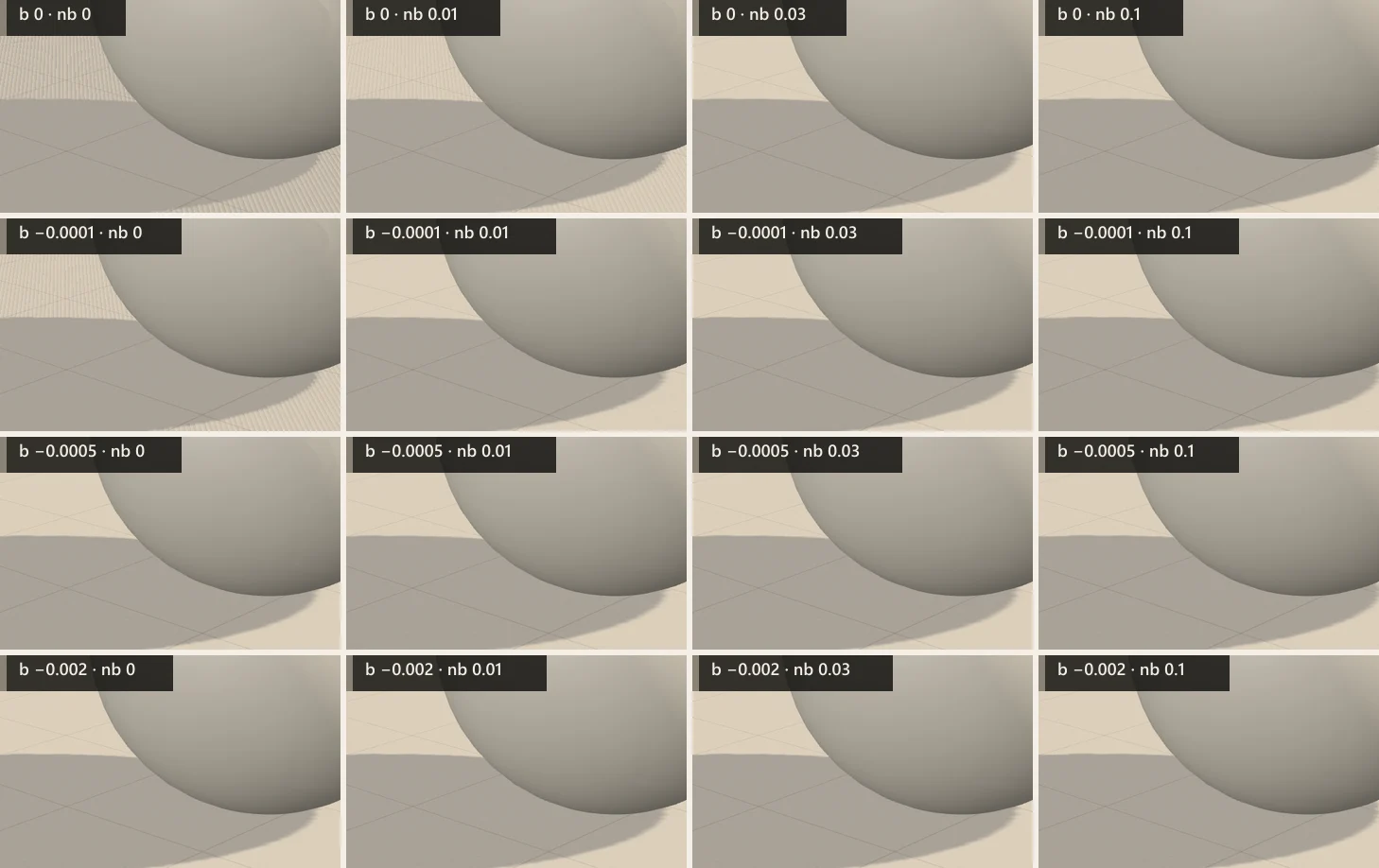
bias; columns: normalBias. Look at the ground left of the sphere and at the sphere’s shaded side. Click or tap the image to enlarge it.In this scene a normalBias of about one texel clears acne on the flat ground by itself, while bias needs roughly 6 cm of depth offset to do the same at this sun angle. The same values, as world-space offsets:
| Setting | Value | Offset in this scene | Result |
|---|---|---|---|
bias | −0.0001 | 1.2 cm of light-space depth | Acne remains |
bias | −0.0005 | 6.0 cm of light-space depth | Clean; contacts still look attached |
bias | −0.002 | 24 cm of light-space depth | Clean, but contacts start to detach; the gap on the ground depends on the light angle |
normal | 0.01 | 1 cm along the normal = 0.6 texel | Clean on the ground; terminator acne stays on the sphere |
normal | 0.03 | 3 cm along the normal = 1.9 texels | Clean in this view |
normal | 0.1 | 10 cm along the normal = 6.4 texels | Clean; the shadow edges visibly move |
Two consequences for this kind of setup. The normalBias that works scales with the texel, so when you change mapSize or the width of the shadow camera, re-derive it; 1–1.5 texels was our starting point, not a law. The bias that works scales with far − near, so a forum value like −0.0001 means 1 cm of depth in a scene with far 100 and 10 cm with far 1000. The light angle matters too, because grazing light raises the depth change per texel. Compare values as world-space offsets, not as raw numbers.
Peter-panning and thin casters
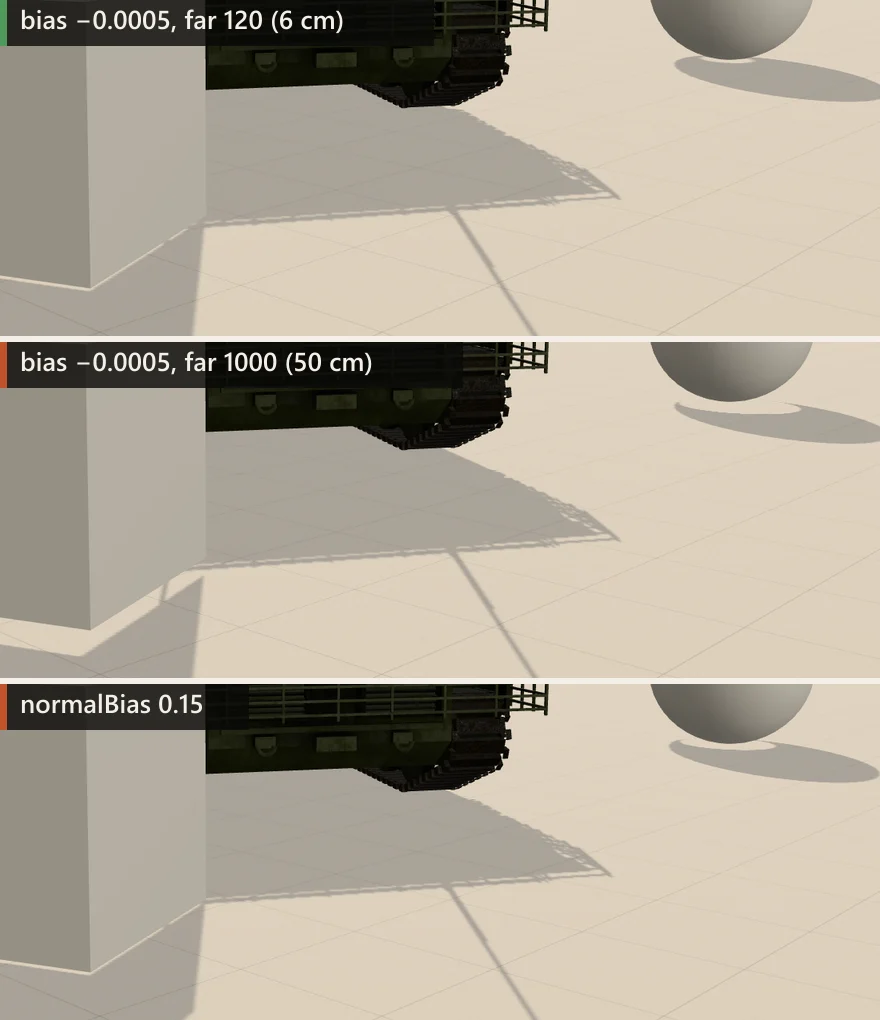
normalBias 0.15 — the contact under the sphere opens up.Too much bias pushes the shadow away from the caster, so the object seems to float above it. This is called peter-panning, after Peter Pan losing his shadow. The middle image shows the most common cause: the shadow camera’s far set large “to be safe”, with a bias copied from another scene. The fix is a tighter depth range rather than a smaller bias; it also improves depth precision:
near/farshould enclose every caster and receiver along the light direction. Derive them from the scene’s bounds, not from the sun’s distance: transform the corners of the bounding box of everything that casts or receives into shadow-camera space and use the depth range with a small margin. TheCameraHelpershows the result.- The shadow camera starts at the light. For a
DirectionalLight,light.positionsets the direction and also where the frustum begins: a sun 1000 m from its target needsfarabove 1000 just to reach the scene. - On flat ground
normalBiasmoves contacts less thanbiasdoes, but it has side effects of its own (bottom image).
A large normalBias makes each receiver pixel sample the map at a point further out along its normal. Near a contact that point can fall outside the caster’s shadow, so the contact opens, as under the sphere. Where a shadow is narrow — an antenna, a fence rail — its edges move by a similar amount, and the shadow can thin out or break up. How much depends on the light and surface angles, so there is no fixed threshold. If you need a large normalBias to stop acne, the texels are usually too large; see the next section.
Pixelated shadows: texel size and the shadow camera
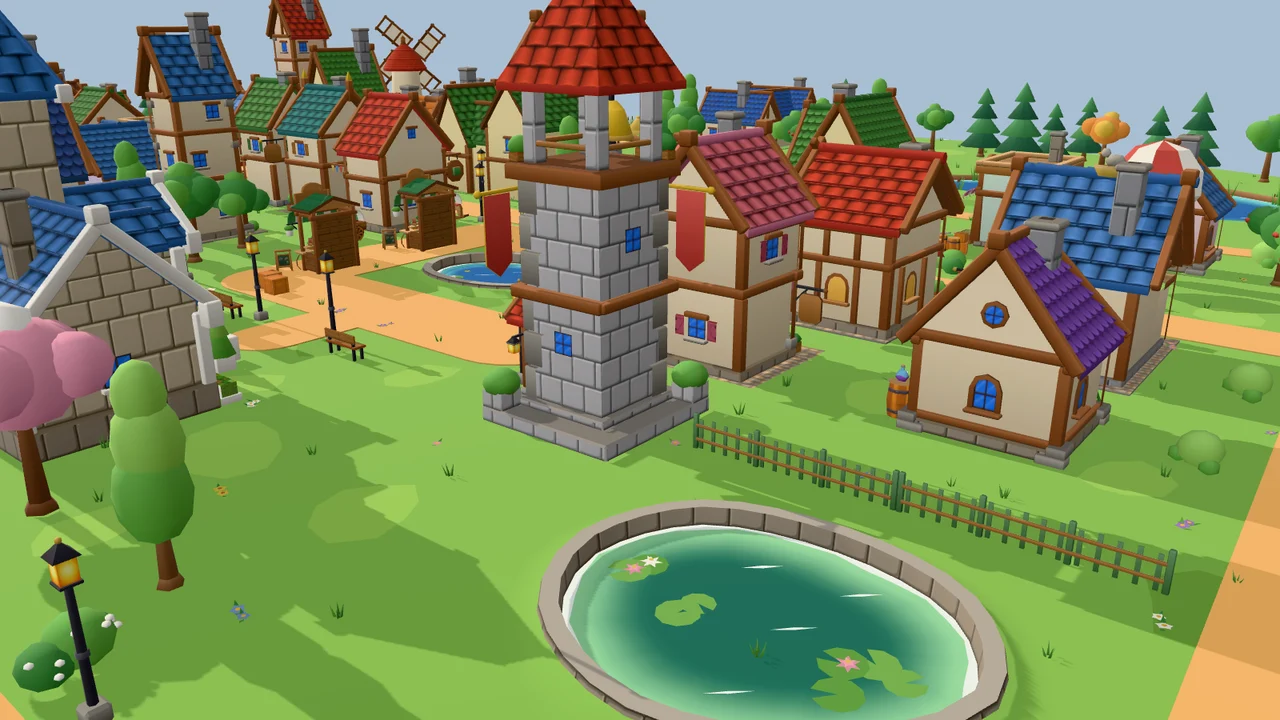
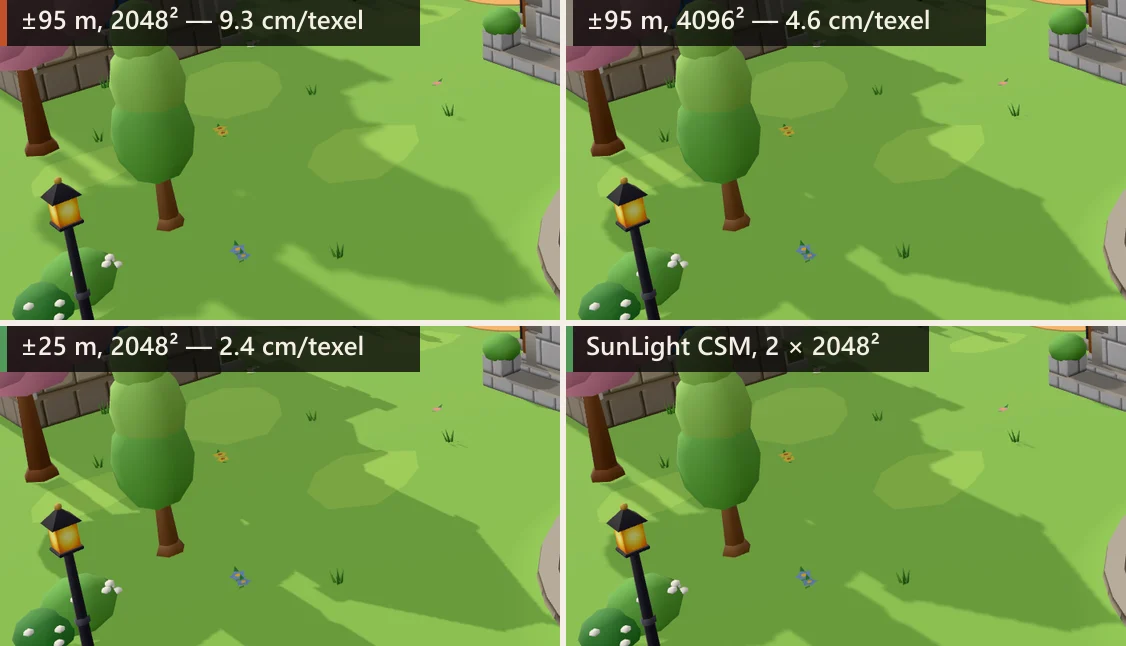
mapSize to 4096² halves that and quadruples the memory; a ±25 m camera around the view gives 2.4 cm with the same 2048². Bottom right: SunLight with two cascades.A shadow map has a fixed number of texels; the shadow camera decides how much ground they are spread over. Texel size = (right − left) / mapSize.x. Covering the whole village with ±95 m at 2048² gives 9.3 cm per texel: a lamp post narrower than a texel can drop out of the map entirely, and every edge is a staircase of 9 cm steps blurred by the filter. Raising mapSize helps only linearly — 4096² costs four times the memory (64 MB as a 32-bit depth texture) for half the texel size — and many mobile GPUs cap textures at 4096. Shrinking the camera helps the same way without extra memory.
So size the shadow camera to what the player sees plus whatever throws a shadow into that area. The second part is easy to miss: a tree just outside the frame must still be in the shadow map to shade the visible road, and with a low sun its shadow is long. Extend the frustum towards the light, and upward for tall casters, by the longest shadow you expect, and make near/far cover those casters too. three.js’s own cascaded sun does the same: SunLightShadow raises its near plane by a full shadow range towards the light “so casters outside the view frustum still cast into it”.
For a game camera, centre the shadow camera on the player (or slightly ahead) and move it with them. Moving it by fractions of a texel makes edges crawl from frame to frame — shimmering — so snap its position to whole texels in light space. A sketch of the pattern; check it against your own light setup:
// every frame before render(); dir = unit vector towards the sun
const _rot = new THREE.Matrix4(), _inv = new THREE.Matrix4();
const _p = new THREE.Vector3(), _o = new THREE.Vector3();
function followShadow( sun, focus, dir, distance ) {
  const c = sun.shadow.camera;
  const texel = ( c.right - c.left ) / sun.shadow.mapSize.x;
  _rot.lookAt( dir, _o, THREE.Object3D.DEFAULT_UP ); // light axes
  _inv.copy( _rot ).transpose();                     // world → light
  _p.copy( focus ).applyMatrix4( _inv );
  _p.x = Math.round( _p.x / texel ) * texel;
  _p.y = Math.round( _p.y / texel ) * texel;
  _p.applyMatrix4( _rot );                           // light → world
  sun.target.position.copy( _p );
  sun.position.copy( _p ).addScaledVector( dir, distance );
}
For views that reach the horizon, one map cannot be both sharp near the camera and far-reaching; that is what cascaded shadow maps do: several maps, small near the camera and large further out. three.js r187 ships a cascaded SunLight in the addons (two cascades, fitted to the view camera and snapped automatically, with a fade between them); older releases have examples/jsm/csm/CSM.js, which patches materials. In our village the two-cascade light keeps street-level shadows as sharp as the ±25 m camera while covering 200 m.
import { SunLight } from 'three/addons/lights/SunLight.js';  // r187
const sun = new SunLight( 0xfff1dc, 3 );
sun.position.set( -0.87, 0.5, 0 );    // direction only; no target
sun.castShadow = true;
sun.shadow.mapSize.set( 2048, 2048 ); // per cascade
sun.shadow.camera.far = 200;          // shadow distance from the view
scene.add( sun );
// WebGPURenderer: SunLight.registerNode( SunLightNode ) firstSunLight’s docs advise against it for small bounded scenes such as dioramas or model viewers: most of the content ends up in the far, low-resolution cascade. For those, a fitted single shadow camera is better.
Basic, PCF, PCFSoft, VSM: what the filters do now
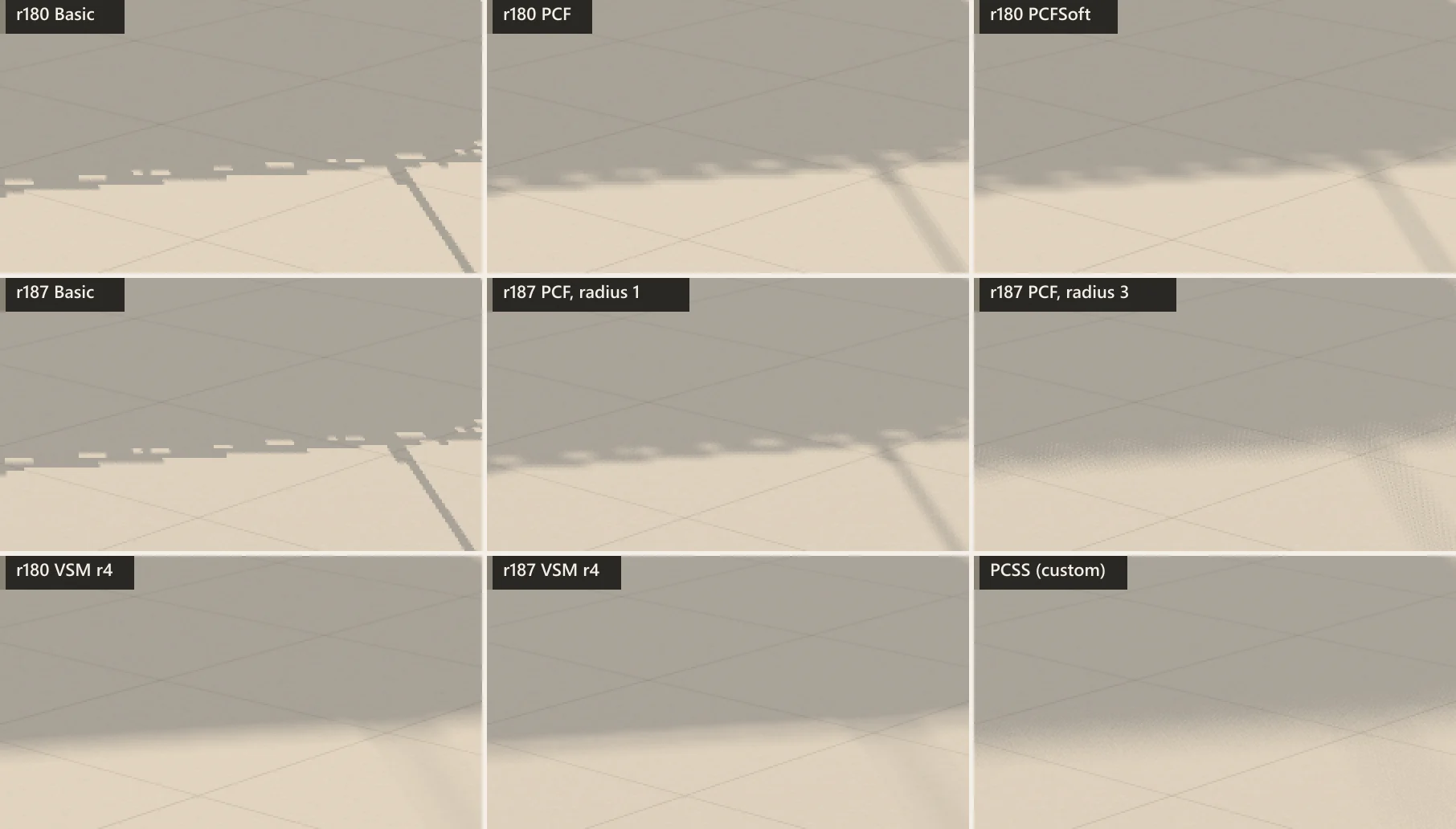
radius; r180 PCFSoft is a bilinearly weighted 3×3 neighbourhood that ignores radius. r187 PCF is five rotated, hardware-filtered samples, grainy as the radius grows. VSM blurs the map itself: smooth, but the edge sits a little further out and detail is lost. PCSS is our demonstration shader (below). Click or tap the image to enlarge it.| Type | r180–r181 | r182+ (WebGL) | Use it for |
|---|---|---|---|
Basic | One comparison, nearest | Same | Pixel-art looks; the cheapest sampling |
PCFShadow | 17 comparisons, offsets × radius | 5 Vogel-disk samples, hardware compare with bilinear filtering, per-pixel rotation; radius in texels | The default for most scenes |
PCFSoft | Bilinearly weighted 3×3 texels; ignores radius | Deprecated → PCF (broken in r182) | Nothing new; migrate to PCF |
VSMShadow | Mean/variance map + blur passes | Same idea, native depth + blur | Wide soft shadows; static scenes; no point lights |
r182 rewrote the WebGLRenderer filters. The map became a depth texture with hardware comparison (sampler2DShadow), and PCF went from 17 fixed comparisons (r181 shader) to five samples on a Vogel disk, each a hardware-filtered 2×2 comparison (r187 shader). PCFSoftShadowMap was deprecated because PCF is now soft by itself. Two things you can tune:
shadow.radiusstill scales the sample offsets in texels (default 1), as the old PCF did, so oldradiusvalues carry over roughly. Scenes that usedPCFSoftShadowMap, which ignoredradius, may see a change if they had set one.- Rotation: the five samples are rotated per pixel with interleaved gradient noise, which trades banding for fine grain: fine at radius 1–3, visibly noisy beyond that (see below).
VSM needs its own notes, because it breaks the rules above:
- Receivers are drawn into the map too (the docs: “all shadow receivers will also cast shadows”), and with their own side, not the opposite one. Every lit surface is therefore in the map, and acne is expected until the depth range and bias are set for it.
- The depth range comes first. With near 1 / far 120 the ground is striped. Near 40 / far 80 removes most of the stripes, and a bias of −0.002 (8 cm of depth at that range) clears what is left.
- Light bleeding: where two occluders overlap at different depths, the variance estimate lets light through. three.js clips the lower 30 % of the estimate to hide it; a larger
radiusmakes it worse. - Cost: two blur passes over the whole map, every time the map updates.
blurSamplesand map size both matter — see the measurements.

Soft shadows: radius, VSM, PCSS, or baking
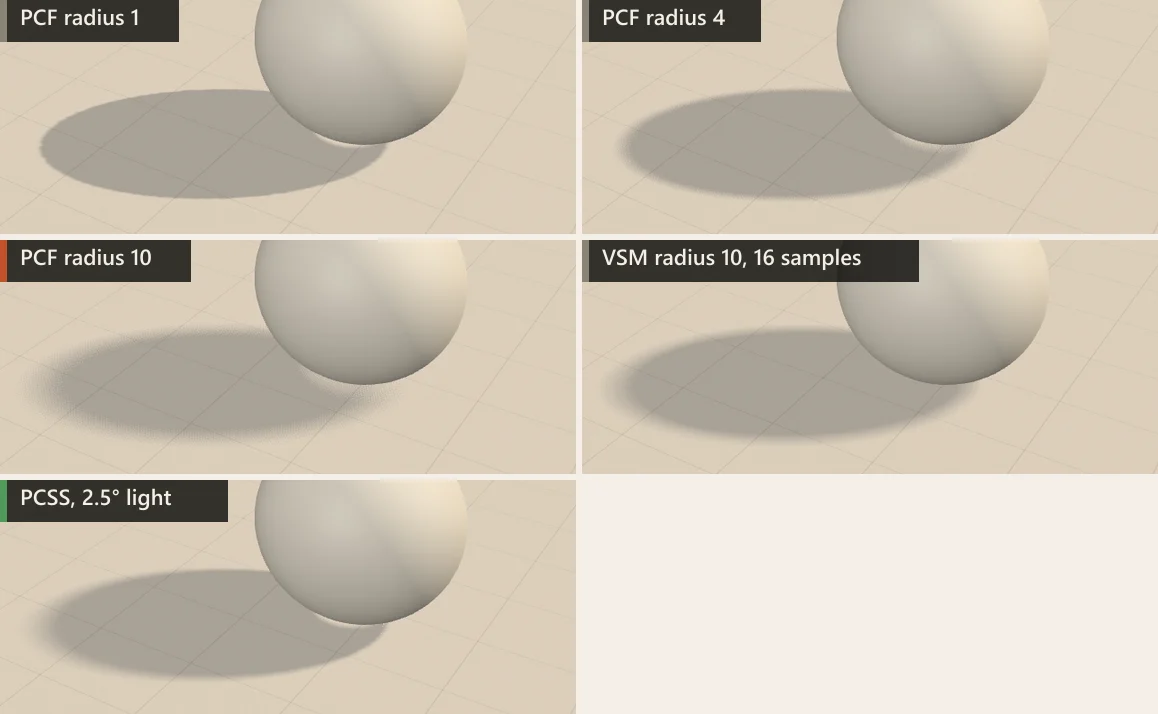
Real shadows are sharp where the caster touches the receiver and soften with distance, in proportion to the light’s angular size (the sun: 0.53°). Your options, from cheapest:
- PCF
radius(r182+). Uniform blur, no extra passes; changing it does not re-render the map. Good up to 3–4; beyond that the five samples show grain, which TAA or a denoiser would have to hide. - VSM with
radiusandblurSamples. Smooth and uniform; pays for the blur whenever the map updates. Watch for bleeding and the depth range. - PCSS (percentage-closer soft shadows): search the map for the average blocker depth, then widen the filter by the blocker–receiver distance. three.js does not ship it; the old example patched
ShaderChunkfor pre-r182 PCF. On r182+ the PCF map is compared in hardware and cannot be read as depth, so a PCSS patch has to useBasicShadowMap, whose map is a plain depth texture. Ours is a demonstration patch of about 40 lines, below, with its limits. - Bake. For static lighting, baked lightmaps give soft shadows with no per-frame shadow cost, paid for with texture memory and a bake step. Baked AO darkens creases and contacts but does not replace a directional shadow. The forum thread settled on baking for static scenes on mobile; we did not measure phones.
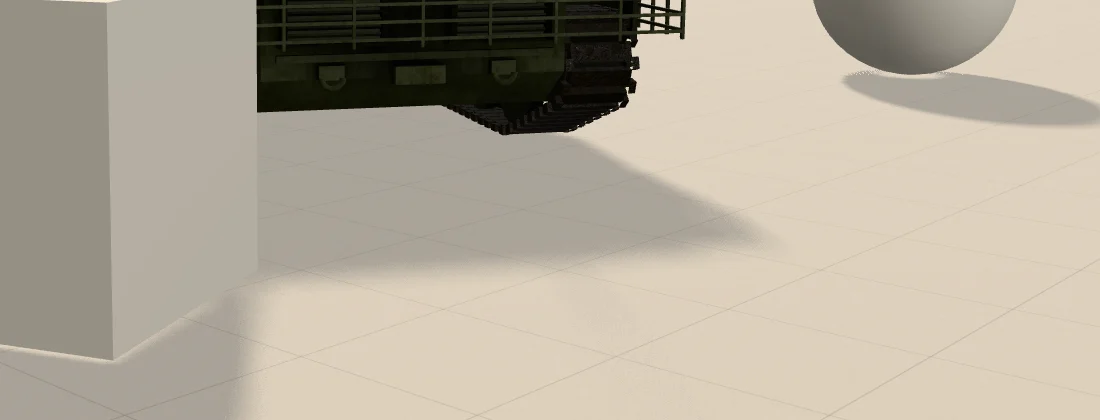
// Demonstration PCSS: WebGLRenderer r187, one DirectionalLight.
// Patches the BASIC branch, whose map is a plain depth texture.
renderer.shadowMap.type = THREE.BasicShadowMap;  // before the first render
const texel = ( cam.right - cam.left ) / sun.shadow.mapSize.x;  // m
const tanL = Math.tan( THREE.MathUtils.degToRad( 2 ) );  // 2° light size
const k = ( cam.far - cam.near ) * tanL / texel;  // texels per unit depth

const pcss = /* glsl */`
vec2 vogel( int i, int n, float phi ) {
  float r = sqrt( ( float( i ) + 0.5 ) / float( n ) );
  float t = float( i ) * 2.399963 + phi;
  return vec2( cos( t ), sin( t ) ) * r;
}
float pcssShadow( sampler2D map, vec2 uv, float z, vec2 texel ) {
  vec2 q = vec2( 0.06711056, 0.00583715 );
  float ign = fract( 52.9829189 * fract( dot( gl_FragCoord.xy, q ) ) );
  float phi = ign * 6.2831853;            // per-pixel rotation
  // 1. average blocker depth within a fixed 24-texel radius
  float blocker = 0.0, n = 0.0;
  for ( int i = 0; i < 16; i ++ ) {
    vec2 o = vogel( i, 16, phi ) * 24.0 * texel;
    float d = textureLod( map, uv + o, 0.0 ).r;
    if ( d < z ) { blocker += d; n += 1.0; }
  }
  if ( n == 0.0 ) return 1.0;
  // 2. penumbra width from the blocker–receiver distance
  float dz = z - blocker / n;
  float pen = clamp( dz * ${ k.toFixed( 3 ) }, 0.0, 24.0 ) + 1.0;
  // 3. filter with that width
  float s = 0.0;
  for ( int i = 0; i < 24; i ++ ) {
    vec2 o = vogel( i, 24, phi + 1.7 ) * pen * texel;
    s += step( z, textureLod( map, uv + o, 0.0 ).r );
  }
  return s / 24.0;
}`;

const SEARCH = 'float depth = texture2D( shadowMap, shadowCoord.xy ).r;';
const chunk = THREE.ShaderChunk.shadowmap_pars_fragment;
if ( ! chunk.includes( SEARCH ) ) throw new Error( 'PCSS: chunk changed' );
THREE.ShaderChunk.shadowmap_pars_fragment =
  '#if defined( USE_SHADOWMAP ) && defined( SHADOWMAP_TYPE_BASIC )\n'
  + pcss + '\n#endif\n'
  + chunk.replace( SEARCH, 'float depth = 0.0;'
    + ' shadow = pcssShadow( shadowMap, shadowCoord.xy, shadowCoord.z,'
    + ' 1.0 / shadowMapSize ); return mix( 1.0, shadow, shadowIntensity );' );
Limits of this patch. It replaces the shadow function for every BasicShadowMap light in the app. k is computed from one shadow camera and map size and baked into the shader, so recompute it and recompile when either changes. The blocker search radius is fixed at 24 texels. It assumes an orthographic shadow camera (a directional light) and standard, not reversed, depth. We tested it on WebGLRenderer r187 only. Treat it as a starting point, not a drop-in feature.
Two cheaper tricks are worth more than any filter in many scenes. A static shadow map — renderer.shadowMap.autoUpdate = false, then renderer.shadowMap.needsUpdate = true whenever the sun or a caster moves — removes the shadow pass from frames where nothing changed; light.shadow.autoUpdate does the same for a single light. Camera-fitted cascades (SunLight, CSM) also need updating when the view camera moves, even in a fully static scene. And a soft contact shadow under dynamic objects (next section) gives the grounding that soft shadows are often wanted for, at a fixed cost.
Cheap ground shadows: blob, planar, projected contact shadow
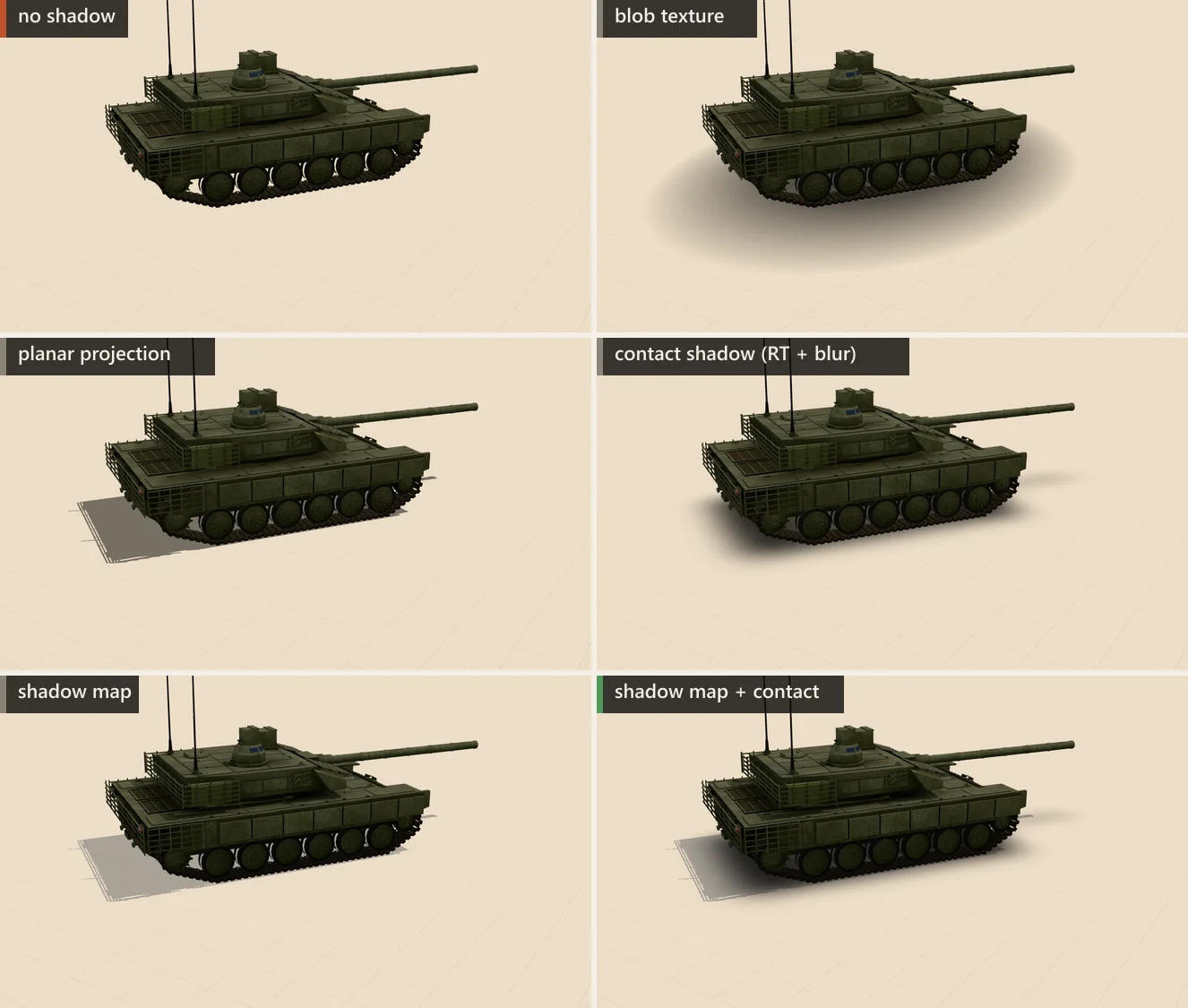
For characters, vehicles and props on a flat floor, often all you need is the cue that the object touches the ground. Three cheap techniques, usable with or instead of a shadow map:
- Blob: one quad per object with a radial-gradient texture,
transparent,depthWrite: falseandpolygonOffset. One draw call, no extra pass. It does not change with height or the light and only works on flat ground; because it is a quad at floor level, it does not go through a platform, which was the forum question. - Planar projection: draw every mesh a second time, flattened onto the ground along the light direction, in a translucent black material. Use the stencil buffer so overlapping triangles do not darken twice. Sharp and directional, but it doubles the draw calls and works on one plane only.
- Projected contact shadow: the three.js
webgl_shadow_contactexample and drei’s<ContactShadows>. An orthographic camera looks up from below the floor and renders the scene’s depth into a small render target, which is blurred twice and drawn on a plane. This is not the screen-space contact shadow of some engines, which ray-marches the depth buffer towards each light. It fades with height (below) and costs one extra scene render each time it updates.

The contact shadow has one trap that our measurements caught. renderer.render() runs the shadow pass whenever shadowMap.autoUpdate is on or needsUpdate is set (WebGLShadowMap) — also for the extra render into the contact-shadow target, a mirror, a cube camera or a minimap. In our 24-vehicle scene that redundant shadow update cost 6.3 ms of CPU per frame: the whole shadow pass a second time.
Which render should update the map? The contact render does not sample shadow maps at all (its override material is unlit), so for it the update is pure waste. For a plain DirectionalLight the map does not depend on the view camera, so it only matters that it is updated once per frame, after lights and casters have moved. Camera-fitted shadows — SunLight cascades, CSM — are fitted to the camera passed to render(), so let the main view update them; a secondary camera would fit them to the wrong view. A mirror or cube camera that does sample shadows can reuse the map if it renders after the map is current; otherwise it sees the previous frame’s map.
function renderContactShadow() {
  const sm = renderer.shadowMap;
  const prev = {
    auto: sm.autoUpdate, needs: sm.needsUpdate,
    target: renderer.getRenderTarget(),
    override: scene.overrideMaterial, background: scene.background
  };
  sm.autoUpdate = false;   // no shadow pass in this render() ...
  sm.needsUpdate = false;  // ... even if an update is pending
  try {
    scene.background = null;
    scene.overrideMaterial = depthMaterial; // alpha = (1 − depth) × darkness
    renderer.setRenderTarget( contactTarget );
    renderer.render( scene, contactCamera );
    blur( contactTarget );                  // horizontal + vertical pass
  } finally {
    scene.overrideMaterial = prev.override;
    scene.background = prev.background;
    renderer.setRenderTarget( prev.target );
    sm.autoUpdate = prev.auto;
    sm.needsUpdate = prev.needs;  // a pending update goes to the main view
  }
}
// static props: call once after loading; moving objects: every 1–3 frames
What shadows cost
24 vehicles (3,800 draw calls): CPU time of renderer.render() per frame
- CPU: renderer.render()
renderer.render() (scene traversal and command submission), not the whole frame; “GPU” comes from timer queries. Draw calls in the table are those of the main render() including the shadow pass; the contact-shadow render is a separate call with the same ~3,800. This scene is CPU-bound: GPU time tracks the CPU time within a millisecond, because the GPU waits for draw calls. The cost of a technique is estimated as the difference between its median and the “no ground shadow” median. Median of 120 frames × 3 page loads; min–max across loads in the table. NVIDIA GeForce RTX 4060 Laptop GPU, Chrome 156, ANGLE → Direct3D 11, 1600×900.All values
| Method | CPU render() | min–max | GPU | Draw calls |
|---|---|---|---|---|
| No ground shadow | 9.2 ms | 8.9 ms–12 ms | 9.4 ms | 3801 |
| Blob texture per vehicle | 10 ms | 9.4 ms–10 ms | 10 ms | 3825 |
| Contact shadow 1024², rendered once | 9.3 ms | 9.3 ms–10 ms | 9.5 ms | 3802 |
| Shadow map 2048², static | 10 ms | 10 ms–11 ms | 10 ms | 3801 |
| Shadow map 2048², every frame | 17 ms | 16 ms–21 ms | 16 ms | 7601 |
| Contact shadow 512², every frame | 17 ms | 16 ms–18 ms | 17 ms | 3802 |
| Contact shadow 1024², every frame | 18 ms | 17 ms–18 ms | 18 ms | 3802 |
| Planar projection (stencil) | 20 ms | 20 ms–23 ms | 19 ms | 7601 |
| Shadow map + contact, every frame | 24 ms | 24 ms–25 ms | 24 ms | 7602 |
| Same, but the contact render() runs the shadow pass again (redundant shadow update) | 31 ms | 30 ms–31 ms | 30 ms | 7602 |
In this scene the shadow pass costs CPU before it costs GPU. Turning on a 2048² shadow map with 24 vehicles doubled the draw calls (3,801 → 7,601) and added 7.5 ms of render() time; the same map kept static added 1.1 ms. The planar projection, which also draws everything twice, cost 11 ms. A per-frame contact shadow re-renders the whole fleet into its target (8.8 ms at 1024², 8.0 ms at 512² — here resolution barely matters, the draw calls do), while the same contact shadow rendered once costs 0.13 ms. Twenty-four blobs: 0.90 ms, within noise.
That is a property of this scene: thousands of draw calls with simple materials. Elsewhere the shadow pass may be limited by the GPU instead — map fill, dense geometry, alpha-tested casters, filtering, memory bandwidth. Measure it on both sides before choosing a fix: compare CPU time and GPU time with the shadow map updating every frame and kept static.
Village, one sun shadow: GPU time per frame by filter and map size (lower is better)
- NVIDIA GeForce RTX 4060 Laptop GPU, shadows every frame
- NVIDIA GeForce RTX 4060 Laptop GPU, static (autoUpdate off)
EXT_disjoint_timer_query_webgl2 around four back-to-back frames, divided by four; median of 120 frames, median of 3 page loads. “Static” renders the shadow map once (renderer.shadowMap.autoUpdate = false) and only samples it, so the difference between the two medians is our estimate of the shadow-map pass itself. VSM includes its two blur passes. NVIDIA GeForce RTX 4060 Laptop GPU, Chrome 156, ANGLE → Direct3D 11, 1600×900.All values, with draw calls
| Config | GPU, every frame | GPU, static | CPU render() | Draw calls |
|---|---|---|---|---|
| none | 0.33 ms | — | 0.40 ms | 188 |
| basic-1024 | 0.85 ms | 0.42 ms | 0.93 ms | 563 |
| pcf-1024 | 1.0 ms | 0.41 ms | 0.95 ms | 563 |
| vsm-1024 | 0.99 ms | 0.39 ms | 1.0 ms | 565 |
| pcss-1024 | 1.2 ms | 0.65 ms | 0.90 ms | 563 |
| basic-2048 | 0.85 ms | 0.35 ms | 0.93 ms | 563 |
| pcf-2048 | 0.92 ms | 0.37 ms | 0.93 ms | 563 |
| vsm-2048 | 1.1 ms | 0.30 ms | 0.95 ms | 565 |
| pcss-2048 | 1.0 ms | 0.67 ms | 0.90 ms | 563 |
| basic-4096 | 0.87 ms | 0.31 ms | 0.90 ms | 563 |
| pcf-4096 | 0.91 ms | 0.33 ms | 0.93 ms | 563 |
| vsm-4096 | 1.8 ms | 0.38 ms | 0.93 ms | 565 |
| pcss-4096 | 1.2 ms | 0.69 ms | 0.90 ms | 563 |
| pcf-8192 | 1.00 ms | 0.28 ms | 0.95 ms | 563 |
| vsm-2048-r16 | 1.3 ms | — | 0.97 ms | 565 |
| r180-pcf-2048 | 0.91 ms | — | 1.0 ms | 188 |
| r180-pcfsoft-2048 | 0.94 ms | — | 0.95 ms | 188 |
| r180-basic-2048 | 1.3 ms | — | 1.0 ms | 188 |
| csm-2048 | 1.5 ms | — | 1.3 ms | 870 |
With few casters, the picture changes. In the village (305 meshes) every configuration on the NVIDIA GeForce RTX 4060 Laptop GPU stayed around a millisecond: the shadow pass for PCF 2048² took 0.55 ms of GPU time, and going from 1024² to 4096² changed it by 0.06 ms. VSM paid for its blur at 4096² (1.4 ms for the pass), and PCSS was the only filter whose sampling cost showed up in the static bars (0.67 ms vs 0.37 ms for PCF). Note also the draw calls: the main view culls most of the village (188 calls), the ±95 m shadow camera culls almost nothing (375 more calls in the shadow pass). A fitted shadow camera saves CPU as well as texels.
These are one laptop’s numbers (NVIDIA GeForce RTX 4060 Laptop GPU, Chrome 156, ANGLE → Direct3D 11, 1600×900). Frame times on this machine drift by up to 30 % between sessions; compare bars within one chart, not across articles. We did not measure mobile GPUs; the fill-heavy options (large maps, VSM blur, PCSS) are the ones most likely to rank differently there.
Release bug: PCFSoftShadowMap looks pixelated in r182
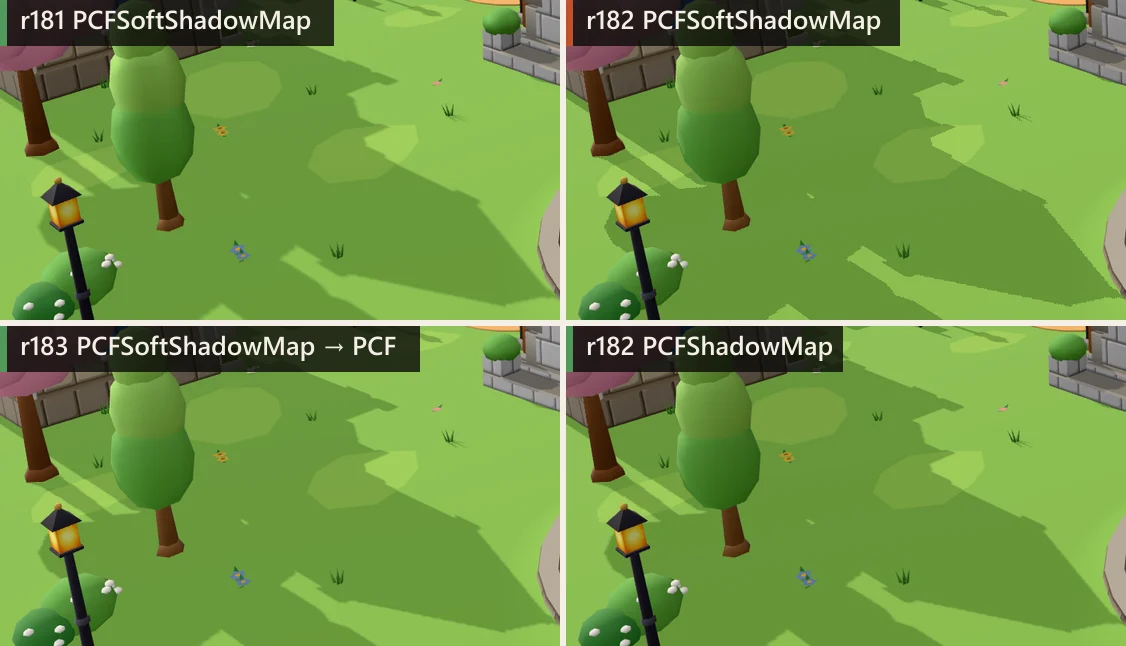
PCFSoftShadowMap shows hard, aliased edges; PCFShadowMap on r182 is fine.If shadows turned blocky the day you updated to three.js r182, this is why. r182 rewrote the WebGL shadow filters (described above) and deprecated PCFSoftShadowMap. The deprecation was meant to switch it to PCFShadowMap automatically, but the check read the wrong object:
// three.js r182, WebGLShadowMap.render( lights, scene, camera )
if ( lights.type === PCFSoftShadowMap ) {  // `lights` is the light array
  warn( 'WebGLShadowMap: PCFSoftShadowMap has been deprecated. ...' );
  lights.type = PCFShadowMap;
}
// r183: if ( this.type === PCFSoftShadowMap ) { ... }
With no switch, the type stayed at 2. The new shader table only knows PCF and VSM, so the program was compiled as SHADOWMAP_TYPE_BASIC, and the depth texture got nearest filtering with no comparison. Result: unfiltered shadows, no warning in the console. This was reported as issue #32591 and fixed in PR #32593 for r183. On r182, set renderer.shadowMap.type = THREE.PCFShadowMap. On r183 and later PCFSoftShadowMap works but logs a deprecation warning (r187: “has been removed”), so change it anyway.
Release bug: acne after switching to WebGPURenderer (r182)
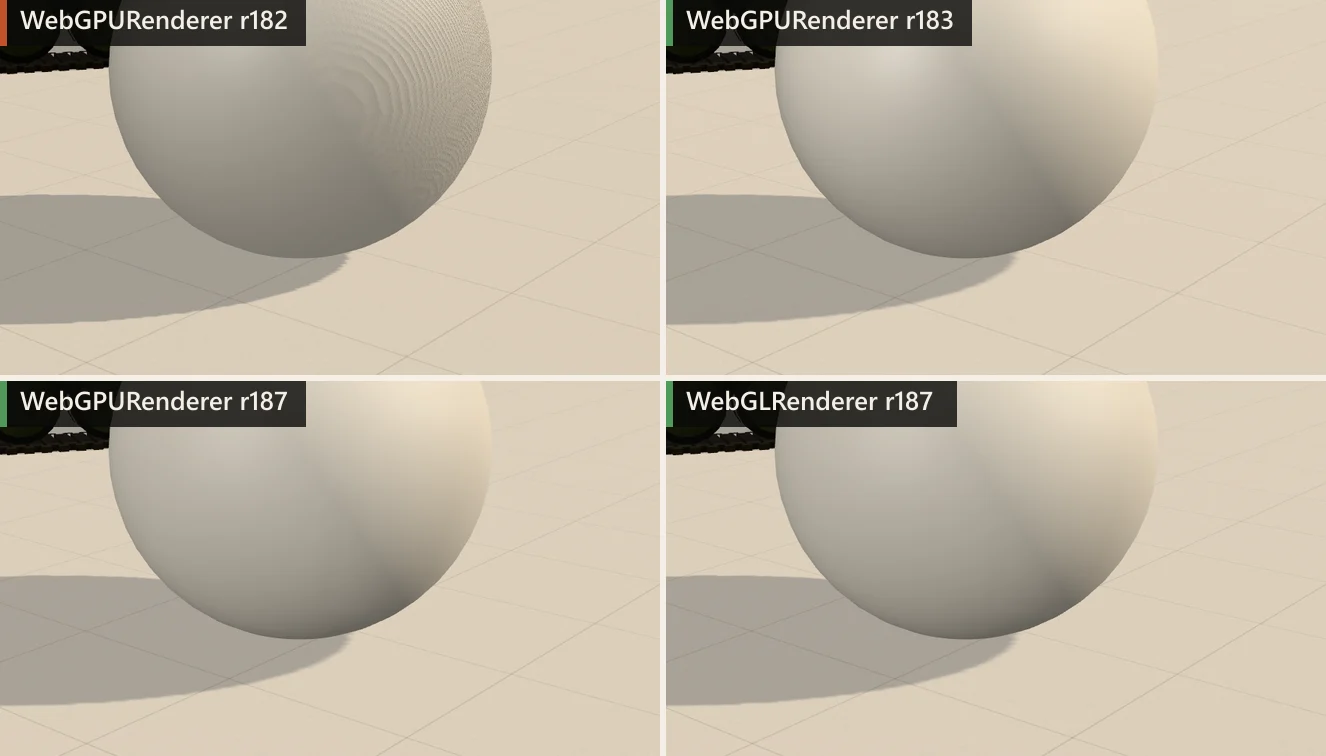
WebGPURenderer r182 shows sawtooth acne and hard edges; r183, r187 and WebGLRenderer are clean with the same settings.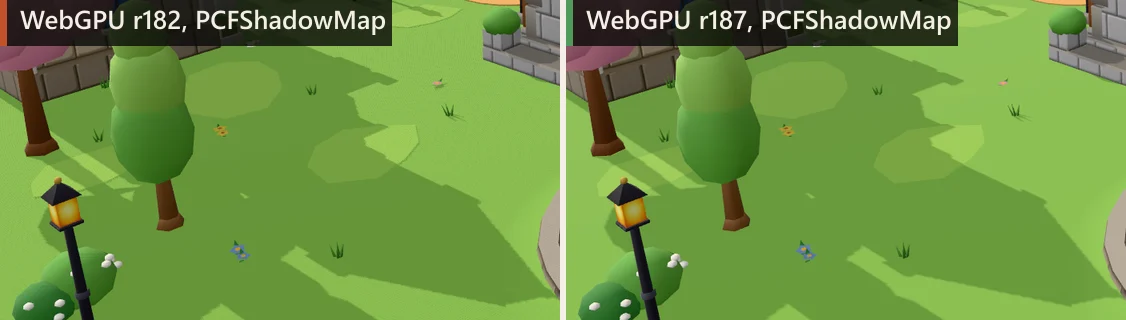
PCFShadowMap in WebGPURenderer: r182 averages its five samples but lacks hardware bilinear filtering of each one, so edges are harder and the grass shows acne; r187 has smoother edges.“Severe shadow acne after switching to WebGPURenderer”: the same scene, same bias, clean in WebGL and full of sawtooth in WebGPU. This was a release bug too. According to the fix, PR #32705 (issue #32698), the main cause was the side drawn into the shadow map: r182’s WebGPURenderer drew material.side — the lit front faces — where WebGLRenderer draws the opposite side. That is the self-shadowing case from the acne section, on every FrontSide mesh. The same PR made other changes that show in our images:
- depth textures for PCF got linear filtering, which is why r182 edges in the village are hard;
- the depth comparison changed from
LesstoLessEqual, as inWebGLRenderer; - blending is disabled in the shadow pass.
Separately, r183’s ShadowNode no longer remaps the receiver depth from [0, 1] to [−1, 1] for the WebGPU backend, which r182 did.
Practical consequence: on r182, update before you tune. The forum workaround — normalBias = 2 — hides the pattern by moving every lookup two metres along the normal, which detaches contacts and breaks up small shadows, as in the peter-panning section. After the fix, the same bias values work in both renderers in our test scene. Two WebGPU details still differ: the r187 node shadow has no PCFSoftShadowMap entry at all (setting it gives no filtering function), and VSM in Safari showed a line at the shadow-map edge (#32708).
Checklist
- Set
castShadowonly on what should cast; flat floors can usually stay receive-only. - Fit the shadow camera to the visible area plus the casters that shade it; follow the view with texel snapping, or use cascades for long views.
- Fit
near/farto the casters and receivers along the light, not to the sun’s distance. - DoubleSide closed meshes:
shadowSide = THREE.BackSide. Open cards keep DoubleSide. - Compute the texel size; start
normalBiasat about 1–1.5 texels and adjust. - Add
biasonly if acne remains, and check its depth offset,bias × (far − near). - r182+:
PCFShadowMapwithradius1–3 instead ofPCFSoftShadowMap. WebGPU: r183 or later. - VSM: tight depth range first, then bias; watch for bleeding.
- Static scenes:
shadowMap.autoUpdate = false+needsUpdateon change, or bake. - Keep secondary
render()calls that do not need a fresh map (contact shadows, minimaps) from running the shadow pass again. - For grounding only: blob or a once-rendered contact shadow before a full shadow map.
- Measure the shadow pass on CPU and GPU separately before optimising.
Frequently asked questions
What causes shadow acne in three.js?
A lit surface that is also in the shadow map is compared with its own depth. The map stores one depth per texel, so between texel centres the surface’s true depth can come out slightly behind the stored one, and the surface shadows itself in stripes or moiré. three.js avoids most of this by drawing the opposite side into the map; acne appears with DoubleSide materials, floors that cast, VSM, and near the terminator of curved surfaces. Fix it with shadowSide = BackSide on closed meshes, then a small normalBias, then a small bias.
What is the difference between bias and normalBias?
bias is added to the receiver’s depth in shadow-map space; for a directional light’s orthographic shadow camera it is a depth offset of bias × (far − near) along the light. normalBias moves the point looked up in the map along the receiver’s normal, in world units; the casters in the map do not change. normalBias clears acne on sloped surfaces with less depth offset, but it moves shadow edges and can open contacts.
Why are my three.js shadows pixelated?
One shadow-map texel covers too much ground. Texel size is the shadow camera width divided by mapSize; fit left/right/top/bottom to the visible area plus off-screen casters, or use cascades, before raising mapSize. On r182 specifically, PCFSoftShadowMap fell back to unfiltered shadows — use PCFShadowMap.
Is PCFSoftShadowMap deprecated?
Yes. Since r182 PCFShadowMap uses five rotated, hardware-filtered samples and is soft by itself; tune it with shadow.radius. r183+ maps PCFSoftShadowMap to PCF with a warning; r182 had a bug and rendered it without filtering.
How do I get soft shadows in three.js?
PCF with radius 2–4 for mild softness, VSM with radius and blurSamples for wide uniform softness, or a custom PCSS shader for shadows that are sharp at the contact. For static lighting, consider baking. Under moving objects, a blurred contact shadow is often enough.
What is the cheapest shadow under a character?
A quad with a radial-gradient texture: one draw call, no extra pass. A contact shadow rendered once is nearly as cheap for static props; rendering it every frame costs one extra scene render.
Sources
- three.js docs — LightShadow (bias, normalBias, radius, blurSamples)
- three.js docs — Material.shadowSide
- three.js r187 — WebGLShadowMap.js (shadowSide, VSM, autoUpdate/needsUpdate)
- three.js r181 — shadowmap_pars_fragment.glsl.js (17-tap PCF, PCFSoft)
- three.js r187 — shadowmap_pars_fragment.glsl.js (Vogel-disk PCF, VSM, Basic)
- three.js r187 — shadowmap_vertex.glsl.js (normalBias)
- three.js r182 — WebGLShadowMap.js (the PCFSoftShadowMap check)
- three.js issue #32591 and PR #32593 — PCFSoftShadowMap fallback in r182
- three.js PR #32705 — Shadow map improvements (WebGPU shadow side, filtering)
- three.js issue #32698 — Severe shadow artifacts in WebGPURenderer
- three.js r187 — ShadowNode.js (WebGPU shadows)
- three.js r187 — SunLight.js / SunLightShadow.js (cascaded sun)
- three.js example — webgl_shadow_contact
- three.js Migration Guide (r181 → r182)
- three.js forum — Shadow pixelation issue in three.js 0.182.0
- three.js forum — Severe shadow acne after switching to WebGPURenderer
- three.js forum — Shadow artifacts with WebGPURenderer VSMShadowMap
- three.js forum — Performant soft shadows
- three.js forum — Fastest way to render a simple round drop shadow under a mesh
- NVIDIA — Percentage-Closer Soft Shadows (Fernando, 2005)
- Microsoft — Common techniques to improve shadow depth maps (texel snapping, cascades)